
Docker vs Kubernetes: Understanding Containers
Docker made it easier to package and run applications. But what happens when you need to manage hundreds of containers across multiple servers? Let's understand containers, Docker and Kubernetes from
 Visit my ByteStore

✍️ Translate this blog into Hindi, Tamil or Telugu
Introduction: Let's Start with a Simple Problem
Docker vs Kubernetes is easier to understand when we start with a simple problem. Imagine you have developed an online shopping application.
Customers can visit your website, browse products, add items to their carts and place orders.
🛍️✨ From the author · ByteStore1:1 DevOps Project & Learning Discussion₹500View offer →You have tested everything on your laptop. The application works perfectly.
Now, you want to run the same application on another computer or a cloud server.
You install the application, but suddenly something doesn't work.
Maybe your laptop has Node.js version 22, but the server has Node.js version 18.
Perhaps one required library is missing. Maybe a configuration is different.
You fix one problem, and another appears.
Have you ever heard someone say:
"But it works on my machine!"
This is one of the problems that containers help solve. But what is the difference between Docker and Kubernetes? In this article, we'll understand Docker vs Kubernetes, why both technologies are important, and how they work together to run applications reliably.
But before we understand containers, let's take a small detour.
1. What Is a Container? Let's Understand It First.
Imagine you manufacture products in India and want to transport them to another country.
You cannot simply throw all your products onto a ship.
You need proper packaging to protect them and make transportation easier.
That's why we use standard shipping containers.
We put the goods inside these containers. The containers can then travel by ship, train or truck.

The goods remain packaged together, even when the mode of transportation changes.
Software containers follow a similar idea.
Instead of shipping physical goods, we package an application along with the files, libraries and dependencies it needs to run.
For example, our shopping application might need:
Application code
Node.js runtime
Required npm packages
Application dependencies
Necessary configuration

A container provides an isolated environment in which the application runs.
In simple words:
A container is an isolated environment that runs an application along with its required dependencies.
Why is this useful?
Imagine you developed your shopping application on your laptop.
You package it into a container.
Now you can run that same application on another compatible machine without manually setting up all its application dependencies again.
This makes application deployment more consistent and predictable.
One important detail: containers share the host operating system's kernel rather than carrying a complete guest operating system like traditional virtual machines.
We'll understand that difference in another topic.
Remember: A container is not a physical box. It is a software environment in which an application runs.
2. What Is Docker?
Now that we understand containers, let's ask another question.
Who helps us create and run these containers?
Meet Docker.
Docker is a platform and collection of tools that help developers build application images, create containers and run containerized applications.
Think of our shipping analogy again.
The goods represent our application.
The shipping container represents the software container.
Docker provides the tools to package the goods and create the container.
Docker helps us:
Build application images.
Create containers from images.
Run and stop containers.
Manage images and containers.
Configure container networking and storage.
Let's understand two important terms.
2.1 What Is a Docker Image?
Imagine you have a recipe for making a cake.
The recipe tells you what ingredients are needed and how to prepare the cake.
You can follow the same recipe multiple times and make multiple cakes.
A Docker image works somewhat similarly.
It is a packaged, read-only template containing the application and the files, runtime and dependencies needed to create containers.
For example, we create an image called:
shopping-app

This image contains everything our application needs to run, subject to the host environment and external configuration.
2.2 What Is a Docker Container?
A container is a running instance created from an image.
Think about the difference:
Image = Template
Container = Running instance created from that template
One image can create multiple containers.
For example, we can use the same shopping application image to create five containers.

All three containers are created from the same image.
This is useful because we don't need to build a completely different application package for every running copy.
2.3 Let's Try It
Build an image:
docker build -t shopping-app .What does this command do?
docker buildbuilds an image.-tgives the image a name or tag.shopping-appis our image name..tells Docker to use the current directory as the build context.
Now run a container:
docker run -d --name my-shopping-app shopping-appHere:
docker runcreates and starts a container.-druns it in the background.--namegives the container a name.shopping-appis the image used to create it.
Check the running container:
docker psYou should see your running container.
What have we achieved?
We packaged our application into an image and created a running container from it.
So far, everything is working perfectly.
But now let's introduce a new problem.
3. What Happens When Our Application Becomes Popular?
Initially, our shopping application has only a few customers.
One container running on one server might be enough.
But imagine the application becomes popular.
Thousands of customers start visiting the website.
One container may no longer be enough to handle the traffic.
So what do we do?
We start more containers.

Now imagine we need to run the application across five servers.

Now we have ten containers running across five servers.
- Who will manage all of them?
- What happens if one container crashes?
- What if an entire server goes down?
- What if traffic suddenly increases?
- Who decides which server should run a new container?
- Are we going to log in to every server and manage everything manually?
This is where things become difficult.
Docker helps us build images and run containers. But manually managing a large number of containers across multiple machines becomes complicated.
We need something that coordinates the entire operation.
4. What Is Kubernetes?
Let's return to our shipping analogy.
We have:
Goods that need to be transported.
Shipping containers that hold the goods.
Ships that transport the containers.
Now imagine a busy port with hundreds of ships and thousands of containers.
Someone needs to coordinate everything.
Questions arise:
Which ship should carry which container?
What happens if a ship cannot continue?
How do we manage additional cargo?
How do we keep track of everything?
This is where a port authority becomes useful.
The port authority coordinates the operation instead of expecting someone to manage every container and ship manually.
In the software world, Kubernetes plays a similar coordinating role.
Kubernetes is an open-source container orchestration platform.
Let's understand the word orchestration.
Orchestration means coordinating and managing multiple activities or components so that they work together.
In Kubernetes, this means managing containerized applications across a group of machines.
Kubernetes helps us:
Schedule workloads on available machines.
Maintain the required number of application replicas.
Replace failed Pods.
Reschedule workloads when nodes fail.
Scale applications.
Provide service discovery and networking.
Perform rolling updates and rollbacks.
Manage application configuration and secrets.
In simple words:
Docker helps us build and run containers. Kubernetes helps us manage containerized applications at scale.
5. What Is a Kubernetes Cluster?
Before understanding what Kubernetes does, we need to understand one important term: Cluster.
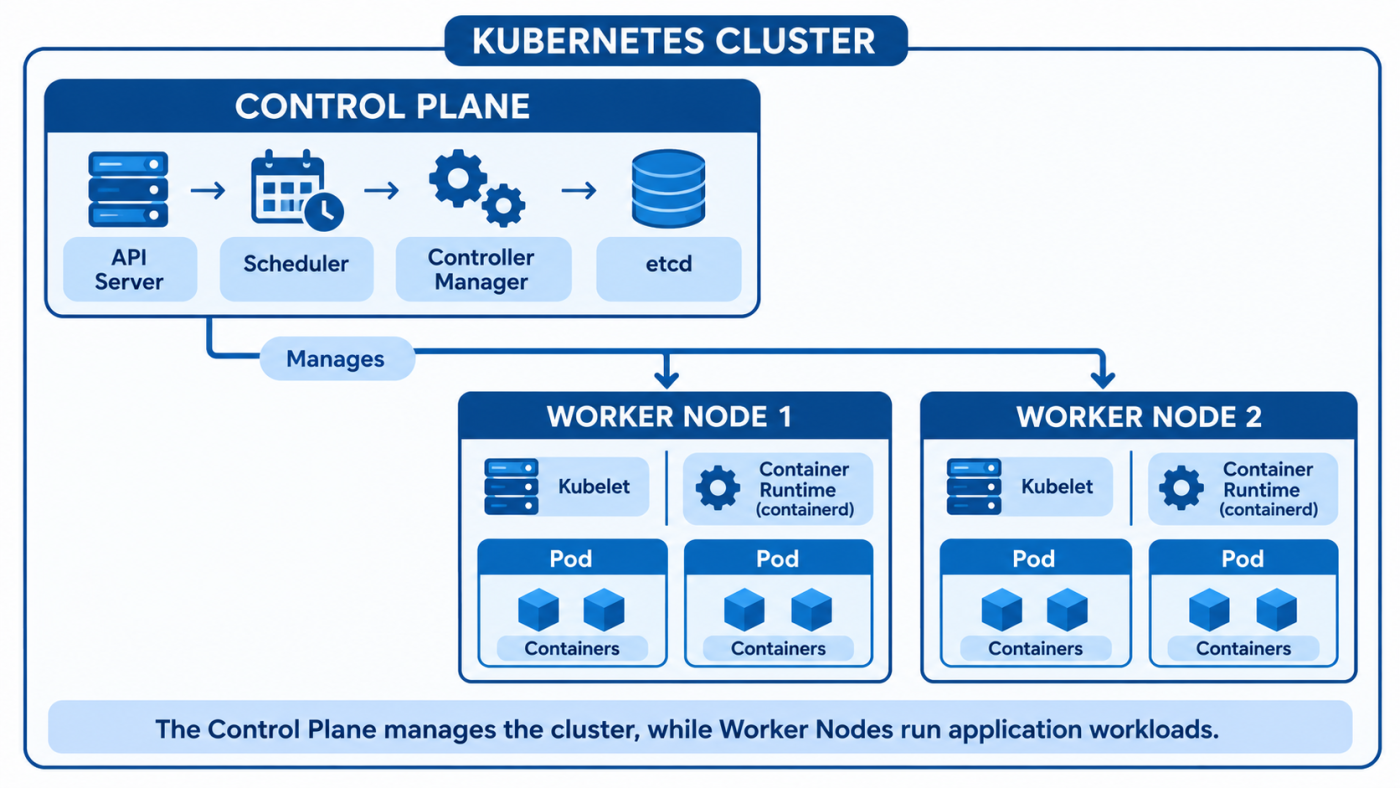
A Kubernetes cluster is a group of machines that work together to run containerized applications.
These machines are called nodes.
A cluster has two major parts:
Control Plane
Worker Nodes
Let's understand them.
5.1 Control Plane
Think of the control plane as the management team of our port.
It makes decisions about the cluster and coordinates what needs to happen.
For example:
How many application replicas should run?
Which node should run a particular workload?
Is the actual state matching the desired state?
The control plane contains important components such as:
API Server
Scheduler
Controller Manager
etcd
We'll explore each component in detail in a dedicated Kubernetes architecture topic.
5.2 Worker Nodes
Worker nodes are the machines where our application workloads run.
They contain components such as:
Kubelet
Kube-proxy (in clusters using kube-proxy)
A container runtime, such as containerd or CRI-O
The container runtime is responsible for running containers.
An important detail: Kubernetes does not directly use Docker Engine as its required container runtime.
Let's look at the basic structure.
Don't worry if these terms look unfamiliar.
For now, remember:
The control plane manages the cluster, and worker nodes run the application workloads.
6. Why Do We Need Kubernetes? The Real Problems It Solves
Now we have enough background to understand why Kubernetes exists.
Let's take our shopping application and explore what can go wrong.
Problem 1: What If a Container Crashes?
Imagine our shopping application is running inside three containers.
Suddenly, one container crashes because of an application error.

What happens now?
With plain Docker, you can configure restart policies to automatically restart containers on that same host.
But Docker alone does not provide cluster-wide orchestration that automatically maintains application replicas across multiple machines.
With Kubernetes, we can declare that we want three replicas.
Kubernetes continuously checks whether the actual state matches the desired state.
If a Pod disappears, Kubernetes creates a replacement to bring the number of replicas back to the desired count, assuming the cluster has sufficient resources.

This capability is called self-healing.

Remember: Kubernetes replaces failed Pods. It does not necessarily repair the original container.
Problem 2: What If an Entire Server Goes Down?
Now imagine our application is running on Server 1.
Suddenly, Server 1 becomes unavailable.
All the containers running on that server are affected.

With plain Docker running independently on each server, you would need to manage recovery yourself.
Kubernetes monitors node health.
When a node becomes unavailable, Kubernetes can schedule replacement Pods on healthy nodes, provided there is enough capacity and the workload can be rescheduled.
This is called rescheduling.
One important distinction:
Kubernetes does not magically move the exact same running container to another machine. It creates replacement Pods on available nodes.
Problem 3: What If Customer Traffic Increases?
Imagine your shopping website normally receives 100 customers at a time.
Suddenly, a festival sale begins.
Now 10,000 customers are visiting your website.
One container may not be enough.
With Docker, you can manually start additional containers.
But what if traffic changes throughout the day?
You don't want to keep checking traffic and manually starting or stopping containers.
Kubernetes provides scaling.
For example, you can declare:
Desired replicas = 3Kubernetes works to maintain three replicas.
You can also configure the Horizontal Pod Autoscaler (HPA) to increase or decrease the number of replicas based on metrics such as CPU or memory utilization.

This is called scaling.
Problem 4: Who Decides Where Containers Should Run?
Imagine you have five worker nodes.
Each node has different amounts of CPU and memory available.
You want to run a new application workload.
- Which node should receive it?
- Should it run on Node 1?
- What if Node 1 does not have enough available resources?
- Should it run on Node 3?
Manually making these decisions for hundreds of workloads becomes difficult.
Kubernetes has a component called the Scheduler.
The Scheduler selects a suitable node for a newly created Pod based on scheduling requirements and available resources.

This process is called scheduling.
Problem 5: How Do Containers Find Each Other?
Imagine your shopping application has three services:
- Frontend
- Backend
- Database
The frontend needs to communicate with the backend.
The backend needs to communicate with the database.
But containers can be recreated, and their IP addresses can change.
If we hard-code container IP addresses, communication can break when containers restart or are replaced.
Kubernetes solves this using Services and DNS-based service discovery.
For example:

A Kubernetes Service provides a stable network endpoint for accessing a group of Pods.
Kubernetes DNS allows applications to discover Services using their names.
For example:
backend-serviceInstead of remembering the changing IP address of an individual backend Pod, the frontend can communicate with the Service.
This is called service discovery.
Problem 6: How Do We Release a New Application Version?
Imagine your shopping application is currently running version 1.
Your team has developed version 2 with new features and bug fixes.
How do you release it?
With a basic manual Docker workflow, you might stop old containers and start new ones.
But if you stop everything before starting the new version, customers may experience downtime.
Kubernetes supports rolling updates.
Instead of replacing every old Pod at once, Kubernetes can gradually replace old Pods with new ones.

This helps keep the application available during an update.
Kubernetes also supports rollbacks.
Suppose version 2 introduces a problem.
You can roll back to a previous Deployment revision.
kubectl rollout undo deployment/shopping-appThis tells Kubernetes to roll back the Deployment to a previous revision.
Remember: rolling updates reduce downtime, but zero downtime is not automatically guaranteed. Readiness probes, application compatibility and update configuration matter.
Problem 7: Where Do We Store Configuration and Secrets?
Applications need configuration.
For example:
Database host
Application environment
API endpoints
Database passwords
API tokens
With manually managed Docker containers, configuration may be spread across environment files and deployment scripts.
Kubernetes provides dedicated objects for configuration management.
ConfigMap
Stores non-sensitive configuration data.
Example:
APP_ENV=production
LOG_LEVEL=info
Secret
Stores sensitive configuration data such as passwords and tokens.
Example:
DB_USERNAME=admin
DB_PASSWORD=example-password
A Kubernetes Secret is not automatically encrypted merely because it is called a Secret. Encryption at rest and proper access controls should be configured.
The important difference:
ConfigMap = Non-sensitive configuration.
Secret = Sensitive configuration.
7. Docker vs Kubernetes: Side-by-Side Comparison
Now that we understand the problems, let's compare both technologies.
| Area | Docker | Kubernetes |
|---|---|---|
| Main purpose | Build images and run containers | Orchestrate containerized applications |
| Scope | Can run containers on a host | Manages workloads across a cluster |
| Images | Builds and manages images | Runs workloads using images |
| Failure handling | Restart policies on a host | Replaces failed Pods and reschedules workloads |
| Scaling | Can manually run more containers | Declarative replicas and autoscaling |
| Scheduling | You select the host | Scheduler selects a suitable node |
| Networking | Bridge networks and port mapping | Services, DNS, Ingress and Gateway API |
| Updates | Depends on your deployment workflow | Rolling updates and rollbacks |
| Configuration | Environment variables, files and volumes | ConfigMaps and Secrets |
| Management style | Commonly imperative commands | Declarative desired-state management |

Important: Docker Compose and Docker Swarm also provide multi-container and orchestration capabilities. Kubernetes is a widely adopted platform for orchestrating containerized workloads at scale.
8. Let's See the Difference Through Commands
Let's create three copies of our NGINX application.
NGINX is a popular web server.
8.1 Using Docker
Run:
docker run -d nginx:1.27
docker run -d nginx:1.27
docker run -d nginx:1.27
What did we do?
We manually started three containers using the same image.
Docker runs these containers on the host where we executed the commands.
We are responsible for managing the desired number of copies and coordinating them across machines.
8.2 Using Kubernetes
First, make sure you have a Kubernetes cluster and a working kubeconfig.
Now run:
kubectl create deployment web --image=nginx:1.27 --replicas=3Here:
kubectlis the Kubernetes command-line tool.create deploymentcreates a Deployment.webis the Deployment name.--image=nginx:1.27specifies the container image.--replicas=3requests three Pods.
Check the Pods:
kubectl get podsYou should see three Pods running once they have been successfully scheduled and started.
Example output:
NAME                    READY   STATUS    RESTARTS
web-6b7f9d8c5d-4xkqp    1/1     Running   0
web-6b7f9d8c5d-9mtzr    1/1     Running   0
web-6b7f9d8c5d-ls2vn    1/1     Running   0
Notice something important.
We requested three replicas.
Kubernetes created a Deployment that manages the desired number of Pods.
Now try deleting one Pod:
kubectl delete pod web-6b7f9d8c5d-4xkqpCheck again:
kubectl get podsKubernetes notices that the Deployment has fewer than three available Pods and creates a replacement.
This is the desired-state concept in action.
We tell Kubernetes what we want. Kubernetes continuously works to make the actual state match it.
9. Did Kubernetes Remove Docker?
You might have heard people say:
"Kubernetes removed Docker."
This statement is misleading.
Let's understand what actually happened.
Earlier, Kubernetes had an integration called dockershim.
It allowed Kubernetes to communicate with Docker Engine as a container runtime.
However, Kubernetes introduced the Container Runtime Interface (CRI), a standard interface for communicating with container runtimes.
Docker Engine was not designed to implement CRI directly.
So Kubernetes used dockershim as an adapter.
In Kubernetes version 1.24, dockershim was removed.
This means Kubernetes no longer uses Docker Engine through dockershim as its built-in runtime integration.
Instead, Kubernetes commonly works with CRI-compatible runtimes such as:
containerd
CRI-O
But here's the important part.
Docker-built images still work with Kubernetes.
Why?
Because Docker images use a format compatible with the Open Container Initiative (OCI) image specifications.
The image format and the container runtime are two different things.
Think about it:
You can create a shipping container using one manufacturer's equipment and transport it using a ship from another company.
The transportation company doesn't need to be the same company that packaged the goods.
Similarly, Kubernetes doesn't need Docker Engine to run an image built using Docker.
One practical difference: On a Kubernetes node using containerd, you generally use crictl or the runtime's supported tools to inspect containers rather than relying on docker ps.
10. Do We Always Need Kubernetes?
No!
This is a very important point.
Imagine you have a small personal website.
It receives only a few visitors every day.
You run one application container on one server.
Do you really need a complete Kubernetes cluster?
Probably not.
Kubernetes introduces additional complexity:
Cluster management
Networking
Configuration
Monitoring
Security
Resource management
For a small application, Docker Compose may be sufficient.
Docker Compose allows you to define and run multiple related containers using a YAML file.
For example, your application might contain:
Frontend
Backend
Database
You can define all three services in a Compose file and start them together.
Kubernetes becomes more useful when you need capabilities such as:
High availability
Multiple application replicas
Workload scheduling across multiple machines
Automated recovery
Dynamic scaling
Complex networking
Standardized deployments across teams
The technology should solve an actual problem. We shouldn't introduce Kubernetes just because it is popular.
11. Kubernetes in Cloud Environments
You don't always need to install and manage every Kubernetes component yourself.
Major cloud providers offer managed Kubernetes services.
| Cloud provider | Managed Kubernetes service |
|---|---|
| Amazon Web Services | Amazon EKS |
| Google Cloud | Google Kubernetes Engine (GKE) |
| Microsoft Azure | Azure Kubernetes Service (AKS) |
These services help manage important parts of the Kubernetes infrastructure.
For example, in AKS, Azure manages the Kubernetes control plane, while you remain responsible for your workloads and the worker-node configuration according to your chosen setup.
This is useful because managing a production Kubernetes cluster involves much more than simply running containers.
12. The Complete Picture: From Application to Kubernetes
Let's connect everything we learned.

The important relationship is:
Developers write application code.
Docker or another image-building tool creates a container image.
The image is stored in an image registry.
Kubernetes receives the desired workload configuration.
Kubernetes schedules Pods onto suitable worker nodes.
The container runtime runs the application containers.
Kubernetes continuously works to maintain the desired state.
One more important distinction: A Pod is the smallest deployable unit in Kubernetes. It can contain one or more containers. Kubernetes manages Pods, not standalone Docker containers directly.
13. Docker and Kubernetes: Key Concepts to Remember
Let's remember the most important points.
Container: An isolated environment for running an application and its dependencies.
Docker: A platform and set of tools used to build images and run containers.
Docker Image: A packaged template used to create containers.
Docker Container: A running instance created from an image.
Kubernetes: A container orchestration platform that manages containerized workloads across a cluster.
Cluster: A group of machines working together to run applications.
Control Plane: Coordinates and manages the cluster.
Worker Node: Runs application workloads.
Self-healing: Kubernetes works to replace failed Pods and maintain the desired state.
Scaling: Kubernetes can maintain multiple replicas and automatically adjust them using autoscaling.
Service Discovery: Kubernetes Services and DNS help applications find each other.
Rolling Updates: Kubernetes gradually replaces old application versions with new ones.
containerd and CRI-O: Container runtimes that Kubernetes can use.
EKS, GKE and AKS: Managed Kubernetes services from major cloud providers.
14. One Question to Test Your Understanding
Question: What is the difference between Docker and Kubernetes? Why do we need Kubernetes when Docker can already run containers?
A good answer:
"Docker is a platform that helps us build container images and run containers. However, when we need to manage a large number of containers across multiple servers, we need additional capabilities such as scheduling, self-healing, scaling, service discovery and rolling updates.
Kubernetes provides container orchestration. It manages containerized workloads across a cluster and continuously works to maintain the desired state.
Docker and Kubernetes are not direct competitors. We can build images using Docker and run those images in Kubernetes using a compatible container runtime."
The one line to remember:
Docker helps us package and run containers. Kubernetes helps us manage those containerized applications at scale.
Understanding the relationship between Docker and Kubernetes is the foundation. Once this becomes clear, Kubernetes architecture, Pods, Deployments, Services, ConfigMaps and Secrets become much easier to understand.
🛍️ Malathi Shetty's shelf
Courses, cohorts and more from the author
I’m a Senior Software Quality Engineer learning and transitioning into Cloud & DevOps. I’m currently working hands-on with AWS, Azure, Linux, Docker, Kubernetes, CI/CD and DevSecOps. I share what I learn through practical projects and real-world examples.
Visit my ByteStoreLearning, building and sharing practical Cloud & DevOps experiences.🌟 See Malathi Shetty's full profile: blogs, work and verified certificates
Get Malathi Shetty's next blog by email
One email a week when they publish. Add the weekly Best of ByteBlog too. No spam, unsubscribe with one click.
We email you once to confirm. By subscribing you agree to the privacy policy.
Related blogs
 Infantus GodfreyFreelancer
Kubernetes for AI Workloads: GPU Infrastructure Without the GPU
Learn what changes in Kubernetes when deploying AI workloads. Explore GPU scheduling, gang scheduling, inference serving, and cost management patterns.
#sla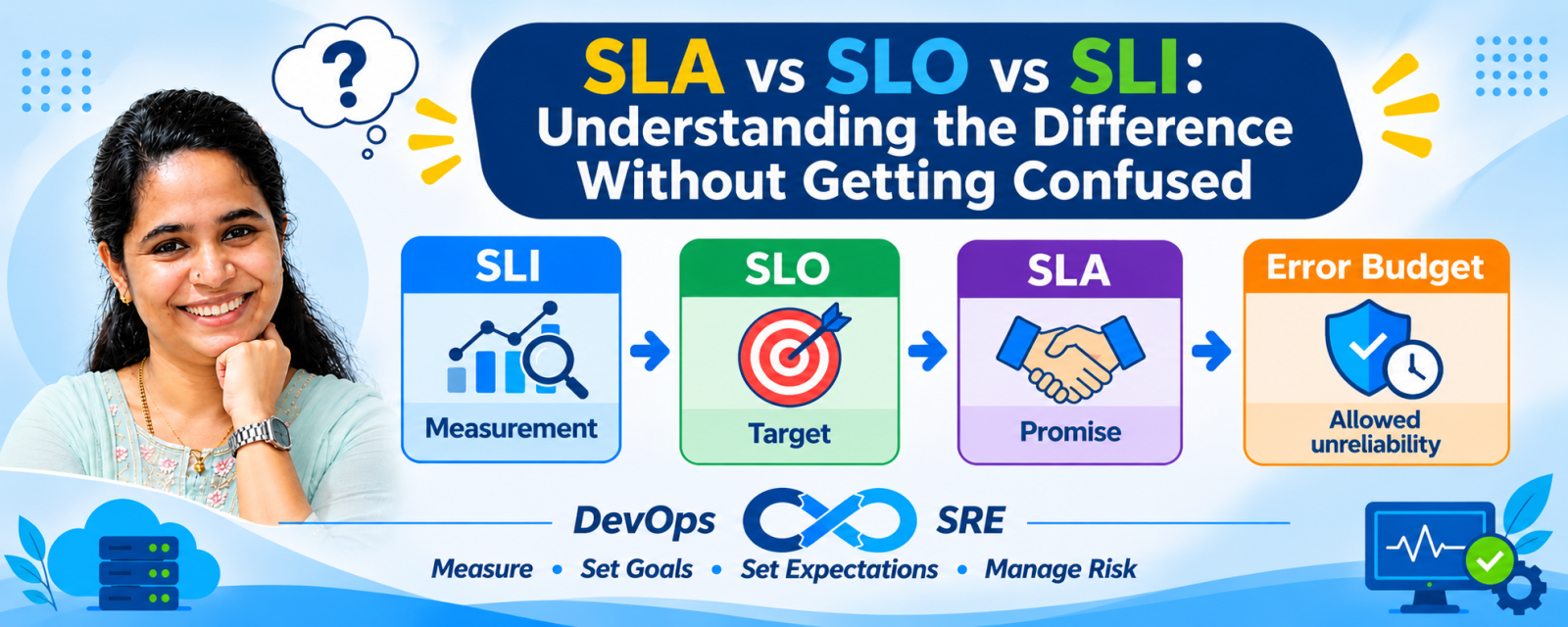 Malathi ShettyFreelancer
SLA vs SLO vs SLI: Key Differences Explained
Understand SLA vs SLO vs SLI with simple examples. Learn how these concepts and Error Budgets help DevOps and SRE teams improve service reliability.
💬 Comments (0)
Top · NewestSign in to comment